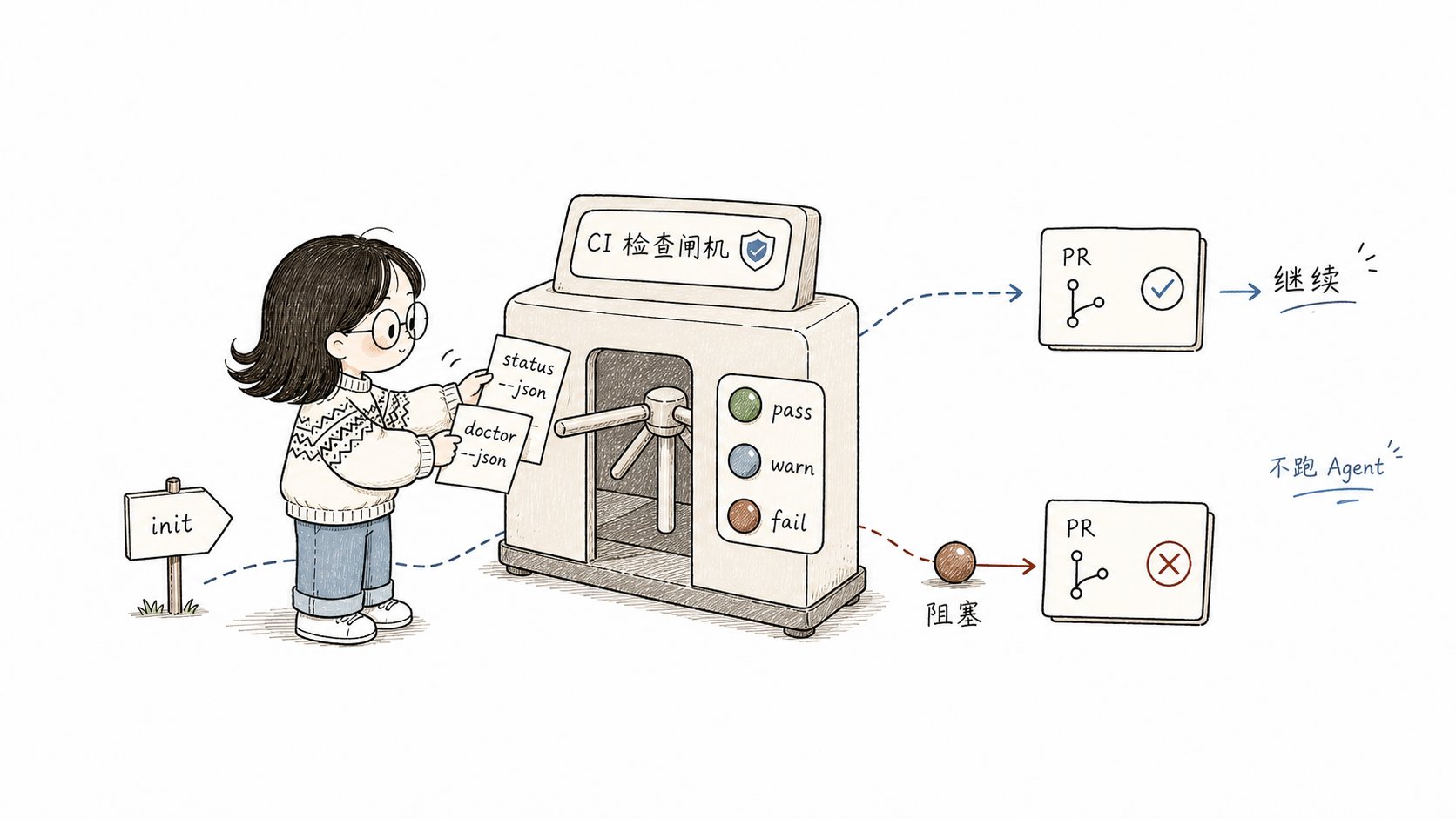
CI 里只做安装和状态门禁;需要 Agent 或人工决策的流程不要放进流水线
## comet doctor --json `comet doctor` 检查项目级和全局安装健康、Skill 完整性、脚本、工作目录和活跃 change 状态。`--json` 输出结构化结果,适合脚本解析。 ### 输出结构 ```json theme={null} { "scope": "auto", "results": [ { "check": "Comet CLI", "status": "pass", "message": "installed (0.4.0-beta.1)" }, { "check": "openspec CLI", "status": "warn", "message": "not installed — install with: npm install -g @fission-ai/openspec@latest" }, { "check": "skills: Claude Code (project)", "status": "pass", "message": "complete (8 files)" }, { "check": ".comet.yaml: add-login", "status": "pass", "message": "valid (step: collect-evidence, mode: classic)" } ] } ``` 每个 `results` 条目的 `status` 是三态之一: | status | 含义 | CI 处理 | | ------ | ------- | -------- | | `pass` | 检查通过 | 继续 | | `warn` | 有问题但不阻塞 | 可继续,建议修复 | | `fail` | 有阻塞性问题 | 应中断 | `doctor` 检查的项包括:Comet CLI、openspec CLI、Superpowers、工作目录、Skill 完整性、脚本存在、CodeGraph、以及每个活跃 change 的 `.comet.yaml` 有效性。 ### 用作 CI 门禁 ```bash theme={null} #!/bin/bash # 只要有 fail 就中断 CI RESULT=$(comet doctor --json) echo "$RESULT" | jq -r '.results[] | select(.status == "fail") | .check + ": " + .message' if echo "$RESULT" | jq -e '.results[] | select(.status == "fail")' > /dev/null; then echo "Comet doctor reported failures — blocking CI" exit 1 fi ``` ## comet status --json `comet status` 输出活跃 change 的状态。`--json` 输出每个 change 的完整状态字段。 ### 输出结构 ```json theme={null} [ { "name": "add-login", "workflow": "full", "phase": "build", "buildMode": "subagent-driven-development", "isolation": "branch", "verifyMode": "full", "verifyResult": "pending", "designDoc": "docs/superpowers/specs/2026-06-24-add-login-design.md", "plan": "docs/superpowers/plans/2026-06-24-add-login.md", "tasksCompleted": 7, "tasksTotal": 12, "nextCommand": "/comet-build", "currentStep": "implement-auth", "runtimeMode": "classic", "runtimeEval": { "stepId": "implement-auth", "passed": false, "requiredEvidence": ["auth-module.ts"], "missingEvidence": ["auth-module.ts"] } } ] ``` 关键字段: | 字段 | 含义 | | ------------------------------- | ----------------------------------------------- | | `phase` | 当前阶段:`open`/`design`/`build`/`verify`/`archive` | | `nextCommand` | 推荐的下一步命令 | | `tasksCompleted` / `tasksTotal` | 任务进度 | | `verifyResult` | `pending`/`pass`/`fail` | | `runtimeEval.passed` | 当前 runtime check 是否通过 | | `runtimeEval.missingEvidence` | 缺失的证据 | ### 变更阶段报告 ```bash theme={null} # 输出所有活跃 change 的进度 comet status --json | jq -r '.[] | "\(.name): phase=\(.phase) tasks=\(.tasksCompleted)/\(.tasksTotal) next=\(.nextCommand)"' ``` 输出示例: ```text theme={null} add-login: phase=build tasks=7/12 next=/comet-build fix-token-refresh: phase=verify tasks=3/3 next=/comet-verify ``` ## CI 环境初始化 CI 环境通常需要非交互安装。`--yes` 跳过所有提示,`--json` 抑制 banner 日志并跳过交互式 CodeGraph: ```bash theme={null} comet init --yes --scope project --language zh --json ``` `--yes` 的默认行为: * 范围默认 `project`。 * 语言默认 `en`(指定 `--language zh` 覆盖)。 * 平台自动检测(检测不到则全选)。 * **已存在组件默认跳过**(不是覆盖)。强制刷新用 `--overwrite`。 ### 典型 CI 流程 ```yaml theme={null} # GitHub Actions 示例 - name: Install Comet run: npm install -g @rpamis/comet - name: Init project (non-interactive) run: comet init --yes --scope project --language zh --json - name: Verify install health run: | comet doctor --json > doctor-report.json # 有 fail 就中断 if jq -e '.results[] | select(.status == "fail")' doctor-report.json > /dev/null; then cat doctor-report.json exit 1 fi - name: Report change status run: comet status --json || true ``` ## PR 检查:阻止损坏的 change 合并 在 PR 检查里用 `doctor` 确保合并到主干的 change 状态健康: ```bash theme={null} #!/bin/bash # PR 检查脚本 echo "Checking Comet change health..." # 1. 安装完整性 if ! comet doctor --json | jq -e 'all(.results[]; .status != "fail")' > /dev/null; then echo "❌ Comet doctor found failures" comet doctor --json | jq '.results[] | select(.status == "fail")' exit 1 fi # 2. 活跃 change 状态有效 CHANGES=$(comet status --json) if echo "$CHANGES" | jq -e 'length > 0' > /dev/null; then echo "Active changes:" echo "$CHANGES" | jq -r '.[] | " - \(.name) [\(.phase)]"' fi echo "✅ Comet checks passed" ``` ## 不适合 CI 的操作 以下操作依赖 Agent 平台交互,不适合在 CI 里运行: | 操作 | 原因 | | --------------------------------- | --------------------- | | `/comet`、`/comet-open` 等 Skill 调用 | 需要 Agent 平台 | | `comet eval ... --html` | 执行真实模型任务,消耗 token 和时间 | | `comet publish approve` | 需要人工评审决策 | CI 里只做**状态检查和安装完整性**,不做需要 Agent 或人工决策的操作。 ## 常见问题