

Audience
The command boundaries are:
SKILL.mdis the entry description seen by both humans and agents.- The
comet/directory is the runtime control plane that determines how to execute, restore, check and evaluate. - For
comet eval, check the pre-release evidence; forcomet skill check, check the runtime check of a certain Run. The two are not the same thing.
Three types of skills
Skill discovery sequence
Search forresolveSkill in the following order. Stop once found:
- explicit -Selector points to an existing directory and loads directly. If the path does not exist, an error will be reported and the search will not continue.
- project -
<projectRoot>/.comet/skills/<selector>, ** takes precedence over built-in **, so the project can override the built-in Skill by name. - builtin —
assets/skills/<selector>。 - None of them were found → fail closed, no silent rollback.
”Skill package structure”
An Engine-enabled Skill package includes more thanSKILL.md; it also includes a comet/ control plane:
<skill-name>/
SKILL.md
comet/
skill.yaml
guardrails.yaml
checks.yaml
evals.yaml
eval.yaml
evals/
evals.json
scripts/
references/
assets/
Responsibilities of each document
confusing name: plural
evals yaml (or checks yaml
It is the runtime eval, which is checked by the Engine at runtime. The singular eval.yaml is the creation period evaluation manifest, which is
comet eval is verified before release. The life cycles of the two are different and should not be confused. checks yaml and
evals.yaml cannot exist simultaneously.skill Definition: Skill.yaml
skill.yaml describes the objective, orchestration method and declared capabilities of a Skill:
Step action type
Theaction.type for each step is one of the following:
Two arrangement modes
The two modes share the same execution loop. The difference lies in who decides the next move.deterministic
- The steps are a static diagram.
entryspecifies the starting point, andnextof each step specifies the next step. - The Engine automatically parses the results of the current step → construct action → pass guardrails → pause, etc.
- After success, move on to
next; If it fails, increase the retry count and remain at the current step. nextindicates that the Run is completed in empty time. Currently,comet skill runonly supports end-to-end execution of deterministic.
adaptive
entryorstepscannot be defined.- Engine ** does not propose actions by itself ** - proposed by an external Agent, injected through
acceptAdaptiveAction, and also through guardrails. - The completion is driven by evals/Agent, and there is no
next: nulltermination step. - The loop layer is ready and has test coverage, but the public entry of
comet skill runcurrently rejects adaptive packages.
Engine runs the loop
The core of Engine is a React-style loop, but Engine itself ** does not execute side effects ** - it is only responsible for decision-making, constraint, recording, and evaluation, while the actual action execution is left to the outside (Agent, platform, or person).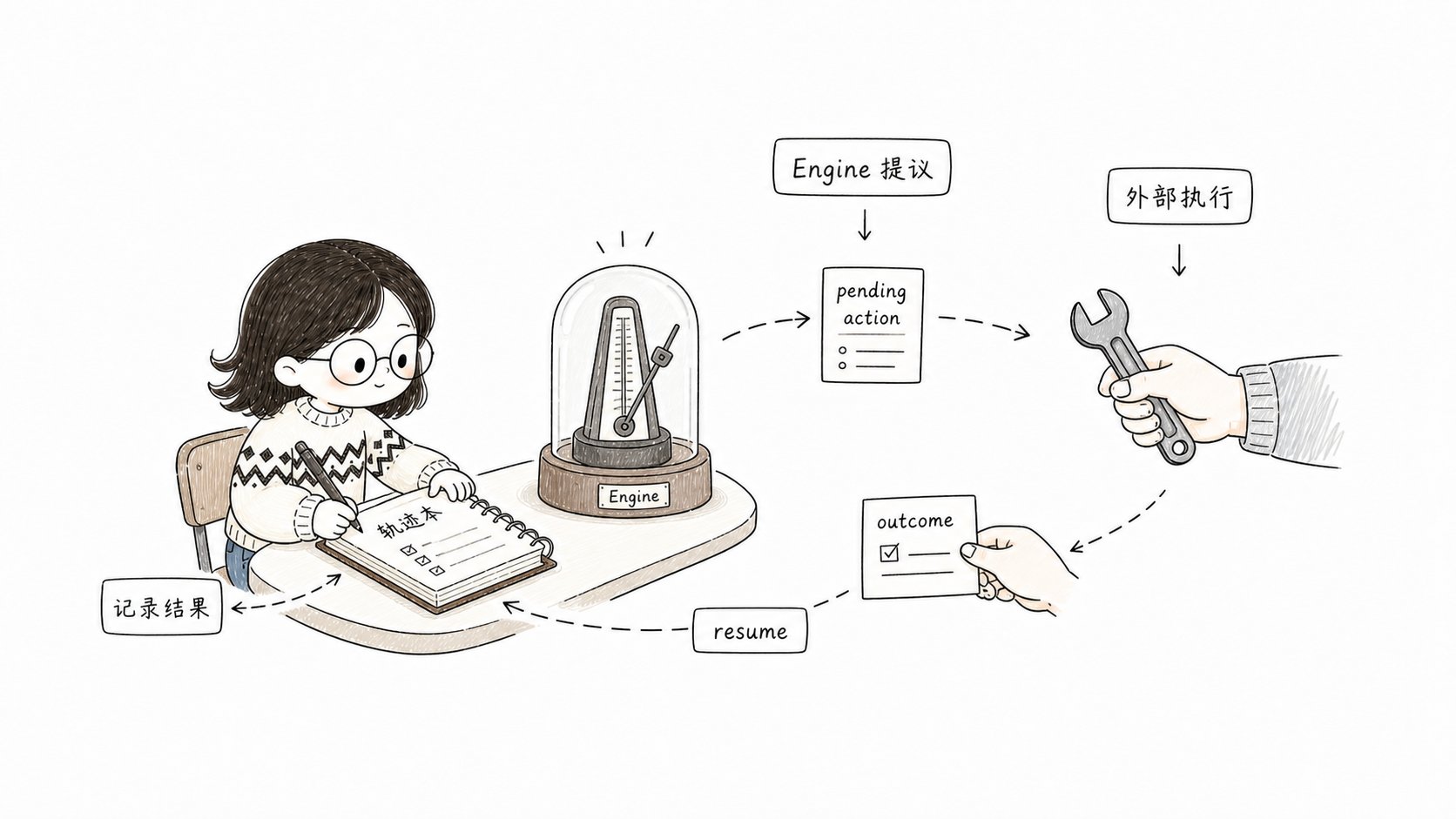
Engine only proposes, constrains and records; The real side effects are carried out externally before resume
pending action: Why pause
The pending action is the mechanism by which the Engine returns control to the executor. After Engine proposes an action, the Run state changes towaiting until the result of this action (ActionOutcome) is submitted externally.
Why pause: Engine is a deterministic state machine, and it does not do actual work itself (no model adjustment, no code writing). It writes “What to do” into the pending action and persists it to the disk. After the external execution is completed, the result is submitted through resume. This also makes the Run ** cross-process recoverable ** — pending action on the disk, and the new process can continue by reading it.
The action id is deterministic: the first 16 digits of sha256(runId:iteration:stepId).
”Run Lifecycle”
run: Start
- Reject the adaptive package (currently).
- Reject existing runs (in change mode, there can only be one Run per directory).
- ** Create an immutable snapshot ** - Freeze the entire Skill package to
.comet/skill-snapshots/<hash>/and hash lock it to Run’sskillHash. - Initialize the Run state:
currentStep = entry,status = running. - Record the
run_startedtrajectory event. decideparses entry step, constructs the first action, passes guardrails, writes pending action,status = waiting.
resume: Submit results or resume
With outcome (actual progress) :- Verify that the submitted outcome corresponds to the current pending action id.
- Merge the artifacts of outcome into the artifacts store.
- Record the
action_completedtrajectory event. recordOutcome: Clear pending, add retry if fails, and advancecurrentStepif successful.- Run step-scope evals.
- If
nextis empty,status = completed, run completion-scope evals. - Otherwise,
decideproposes the next move again.
- Return the current pending action (if it exists).
- Or re-propose the next action when there is no pending status.
eval: Check on demand
comet skill check re-runs evals on the persistent Run state and artifacts as needed, and outputs PASS/FAIL item by item:
Immutable snapshot
Each time Run starts, the Engine freezes the Skill package into an immutable snapshot.How is hash calculated?
Create a stable JSON for{ definition, guardrails, evals } (with keys sorted alphabetically), add SKILL.md and the { path, sha256 } of each script tool source, and finally calculate a SHA-256.
Why is it important
- ** The Run is locked to the Skill version at startup ** — Modifying
skill.yamlafterwards does not affect the ongoing Run. When restoring, reload from the snapshot instead of reading the latest files in the workspace. - ** Tamper-proof ** - When reloading a snapshot, the hash will be recalculated to verify integrity.
- ** Reproducibility ** - The same snapshot + the same outcome sequence generates the same Run trajectory.
Upgrade the running Skill
The only legal way to modify a running Skill version is to explicitly upgrade (--upgrade) :
state_migrated event.
guardrails
guardrails restricts what actions the Engine can perform, withguardrails.yaml overriding the default values.
Default value
Whenguardrails.yaml does not exist, by default: allow list = definition for all skills/agents/tools declared, maxIterations = 50, maxRetriesPerAction = 3, confirmationRequiredFor = all tools marked with requiresConfirmation: true.
Constraint check
Each action should go throughcheckAction before being proposed:
Example
runtime checks
runtime checks is when the Engine checks whether the Run meets the conditions during runtime, which is different from eval (comet eval) during the creation period.
Two types of inspections
Three scopes
Example
status === completed when the Run is completed.
Product authoring lanes
/comet-any classifies and assemps Skill packages through authoring lanes. Each channel is responsible for one type of product, has its own author (deterministic-adapter or subagent), and completes the rendering in sequence.
The output of each channel will carry
protocolHash, which must be equal to workflowProtocolHash(workflow); otherwise, Factory authoring protocol hash drift will be thrown.
Review access control
After the generation is completed,reviewFactoryArtifactProposals is a mandatory review access control. It will check:
- Whether all the necessary channels are complete (
workflow-entry/skill-core/script-contract/reference/skill-review, andevalwhen Engine is enabled). - Whether the necessary artifacts exist (
SKILL.md,reference/workflow-protocol.json,decision-points.md,recovery.md,composition-report.md,resolved-skills.json,skill-review.md, six control plane scripts, etc.). - ** Must claim** Whether it exists and the referenced artifact exists (
workflow-entry,script:workflow-state, etc.). - The product is consistent with the Workflow Contract (nodes, Output Schema, Required Skill Call match).
passed === false), generateFactorySkillPackage will throw Generated Skill package failed authoring review and ** no documents will be written **.
Run state store
Run state is machine-owned and should not be edited manually.Two storage locations
The run-state.json field
Five supplementary documents
All file I/O operations are sandboxed within the “change/run” directory, and absolute paths,
~, drive letters, and .. path traversals are rejected. The write is atomic (write to tmp and then rename).
The relationship between classic workflows and engines
The classic five-stage workflow of/comet-classic is driven by the Engine at the bottom layer, but users do not need to directly operate the Engine.
The boundary between comet.yaml and run-state.json
.comet.yamlsaves workflow projections that users can understand (phase, build_mode, verify_result, etc.) and only links to Engine Run viarun_id.- The complete Run details (currentStep, pending, trajectory, artifacts) are in
.comet/run-state.jsonand not written into.comet.yaml. - When entering a change for the first time,
ensureClassicRundeduces the current step from the classic field of.comet.yaml, creates a snapshot and Run state, and establishes therun_idlink.
The
ComET-Classic definition within the Engine is a deterministic Skill with 28 steps to cover
Three profiles: full, hotfix, and tweak. Users can enter through the permanent entry /comet-classic (or driven by project configuration)
Enter (/comet alias forwarding) without directly operating these internal YAMLs; The Engine loads and runs them at the bottom layer.The packaging method of the Classic control package
comet-classic is packaged as an “internal control package” in pure YAML form under comet/runtime/classic/ and contains three files:
The Engine definition here is not the top-level
comet-classic/ entry directory that the user calls. The internal installation products are these three YAMLs, registered by internalSkills of assets/manifest.json and loaded by Engine. The top-level /comet-classic is only responsible for stabilizing the entry point and workflow orchestration.
When to use /comet-any
If you want to turn a workflow into a team reusable Skill, don’t start with a handwritten Engine file. Use/comet-any to make it read real skills, generate structured evidence, evaluate and enter the release access control.
The normal user path is:
Common commands
Next step
- Workflow Concept ](/en/concepts/workflow) -
/comet-classicHow to use Engine at the bottom layer - comet skill - Complete Command Reference
- Runtime check - The difference between
comet skill checkandcomet eval - Overview of Skill Creator - Creating Engine-enabled Skill with
/comet-any