

/comet 都会重新读取这些文件,不依赖上一轮对话。你只要知道看哪几个文件、用哪条命令排查,就能判断进度并在中断后继续。项目级配置(.comet/config.yaml)见 Classic 配置。
下文用 <classic-root> 表示当前 Classic OpenSpec 根目录:新项目默认是 docs/openspec/,保留旧布局的项目是 openspec/。实际位置由 classic.artifact_layout 决定,详见项目文件结构。
本页分为三部分,完整字段参考放在文末附录:
- 如何查看当前进度:状态文件放在哪里、看哪些字段最直接。
- 哪些设置需要你确认:哪些字段由你在流程节点选择,哪些字段由 Comet 自动维护。
- 出现异常时如何排查:状态转换历史、Run state 边界和诊断命令入口。
如何查看当前进度
想知道”现在做到哪了、还差什么”,正常路径是重新调用/comet(见恢复中断的工作);想人工核对时运行 comet status。两者都从磁盘上的状态文件重读,不猜对话历史。
状态存在三类文件
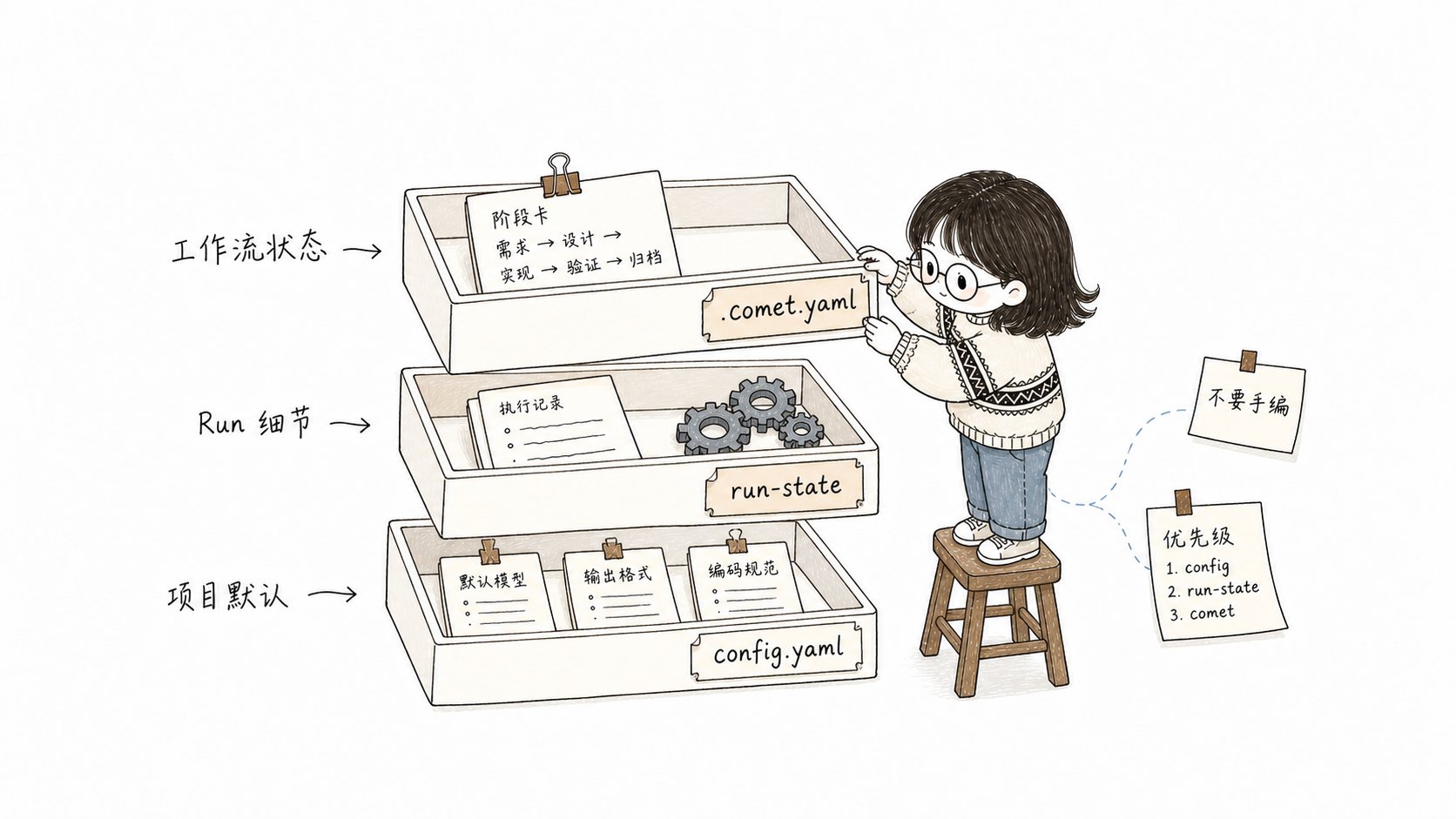
.comet.yaml 告诉你当前在哪,Run state 让运行时恢复,state events 解释状态为什么变了
快速判断进度要看哪些字段
comet status 和 /comet 的恢复路由主要看这几个字段。完整类型和允许值见文末附录。
其中
branch_status: handled 只表示你在归档前已确认立即推送或推送并创建 PR,并在归档完成时写回,它不表示 push 或 PR 已经成功。
多个 change 并行时,先选目标
.comet/current-change.json 保存你当前明确选择的 workflow 和 change,在多个 active change 并行时消除写入歧义。它不替代 .comet.yaml。
- 只有一个 active change 时可以自动归属。
- 多个 active change 时,进入目标 change 后必须显式
select。 - 目标归档、选择文件损坏或 workflow 不匹配后,守卫会失败关闭(fail closed:宁可拒绝执行也不带错误状态继续)。
isolation已设为current、branch或worktree时,change 还会通过bound_branch固定到建立隔离的分支。发生漂移时,切回原分支;只有你明确确认当前分支应接管 change 后,才运行comet state rebind <change-name>。- 不要手工编辑
current-change.json。
哪些设置需要你确认
.comet.yaml 里的字段可以分成两类:一类是你在流程节点要确认的设置;另一类是 Comet 自动维护的运行记录。自动维护字段不要手改(见下一节)。
你会在这些节点做选择
这些字段大多在 change 创建时从项目配置带入默认值。如果你漏选了,守卫会在离开阶段前拦截,并把你带回对应决策点补选;不需要手工改文件。build 阶段缺
isolation、build_mode、tdd_mode 的恢复路径见恢复中断的工作。
进入下一阶段前会检查什么
这些约束同时存在于comet guard 和 comet state transition 两个守卫层:
直接
comet state set <name> phase <value> 会被硬阻止,除非设了
COMET_FORCE_PHASE=1(仅修复用)。阶段推进只能通过 comet guard —apply
或合法 transition。COMET_FORCE_PHASE 是排障专用开关,正常流程用不上;其它环境变量见 Classic 配置。
预设升级只走合法转换
hotfix/tweak 命中升级信号(跨模块、新 API、schema 变更等)时,通过preset-escalate 转换升级到 full:
- 一次性设置
workflow/classic_profile为full,回退phase到design,清除design_doc。 - 这是预设→full 升级的唯一合法通道——直接
set phase design被硬阻止,set classic_profile是 machine-owned 也被硬阻止。
哪些字段由系统维护
这类字段由 Comet 自动写入,用来记录运行过程。你不需要手动设置,也不要用comet state set 强改。
常见字段包括:
bound_branch:记录这个 change 绑定的分支,用来防止你在错误分支继续执行。verify_failures:连续验证失败计数。verify-fail自增,verify-pass或archive-reopen重置为0。达到 3 次后,下一次失败会暂停,由你决定重试上限策略。archive_confirmation:verify 通过后 Comet 写pending;你在归档前确认后才变confirmed。真实归档命令要求confirmed。.comet/run-state.json的currentStep、pending、artifacts、trajectory:Engine 运行时自动写入,不需要手动编写,不要手工编辑。
/comet-archive,不要手工把 change 标记成已完成。
出现异常时如何排查
先区分两种情形:会话中断、上下文压缩、换设备属于正常中断,直接/comet 恢复;只有在 .comet.yaml 缺失、格式异常、路由不对或证据文件找不到时,再用 comet status 和 comet doctor 诊断。完整流程见状态损坏与恢复。
查看状态转换历史
Classic 状态转换共用同一套语义。成功的comet state transition、comet guard --apply 和归档更新都会追加一行 JSON 到:
phase 为什么改变、上一次转换发生了什么,从这里查。可用的 transition 事件与命令见 comet state 和自动推进机制。
区分工作流状态和运行细节
.comet.yaml 保存用户可理解的工作流状态。Engine 运行细节放在 .comet/run-state.json。两者通过 run_id 链接。
详见Skill 与 Engine(进阶)。
常用诊断命令
Engine 层细节(currentStep、pending、trajectory)通常只在排障时查看。常用入口是两条命令:
comet status——看活跃 change 的phase、验证结果、声明的证据是否真的在磁盘上(runtime_eval),以及下一步提示。comet doctor——检查安装、环境、Skill 完整性和每个 change 的.comet.yaml是否有效。
附录:.comet.yaml 字段速查(参考)
每个活跃 change 的 .comet.yaml 包含以下字段。上文已经说明哪些由你确认、哪些由系统维护;下表用于快速查值域和含义。
工作流与阶段
执行方式
验证与分支
路径引用
时间与归档
继续阅读
- Classic 配置 —
.comet/config.yaml字段、配置优先级和环境变量 - 状态损坏与恢复 —
comet status/comet doctor诊断与恢复流程 - 上下文压缩机制 — context_compression 的 off/beta 模式详解
- 代码审查机制 — review_mode 的 off/standard/thorough 详解
- Skill 与 Engine(进阶) — Run state 和 Engine 运行语义
- 工作流概念 — 五阶段如何使用这些状态字段