

What to save here
This classification keeps ownership clear: project-scoped personal habits still belong to you, while team-shared knowledge requires project evidence or an explicit sharing action.
Product positioning
A new Agent session usually starts from a fresh context window. Personal Memory provides a layer of user context independent of the conversation history, managing four things:- Ownership: the record belongs to the current user.
- Scope: the record applies globally or in a specified project.
- Authority: distinguishes what you set explicitly from what the system inferred.
- Lifecycle: supports trial, confirmation, correction, forgetting, and rollback.
Three kinds of personal memory
Core Profile: stable user profile
Core Profile stores information that stays valid across tasks:- Language and expression preferences;
- Role and technical background;
- Output format and evidence habits;
- Stable communication boundaries.
Collaboration Policy: conditional collaboration policy
Collaboration Policy describes how you want the Agent to work under specific conditions:- Run the minimal relevant tests first in a certain project;
- Before changing a specified path, check the artifact sync scope;
- List reproducible issues by severity during Review;
- Check the workspace and remote state before Archive.
Personal Episode: reviewable personal experience
Personal Episode stores a compact record of a success, correction, or failure:- The task context at the time;
- The actions that were taken;
- The actual result;
- The experience you can reuse.
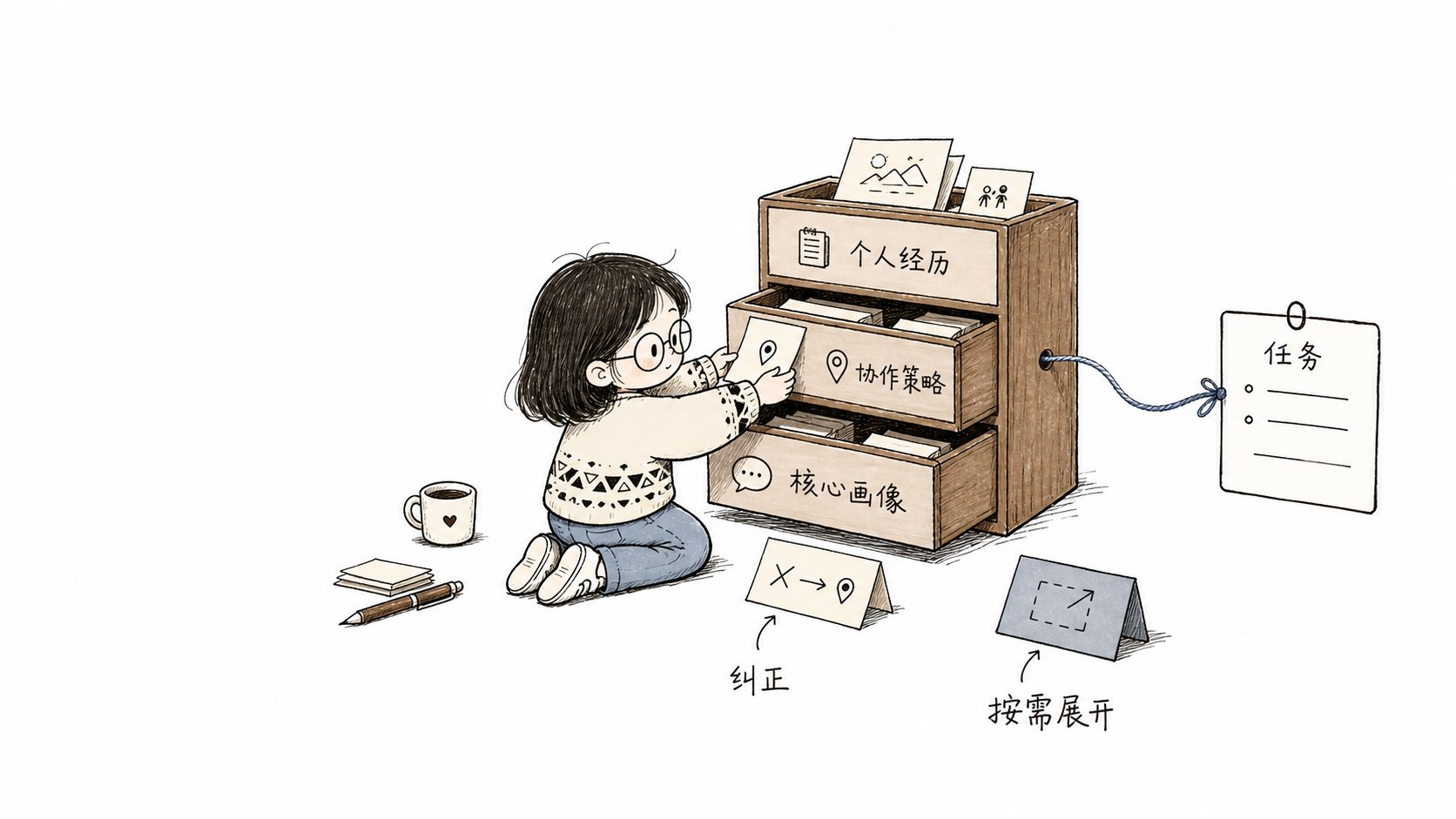
Two ways records form
Set explicitly by you
When you say “remember” or “always do it this way”, or when you correct or forget a record directly, Comet writes it through fixed rules. A clear long-term requirement can enter theproven (confirmed) state directly and take effect in the next related task.
One-time requests such as “this time”, “for the current task”, or “just temporarily” constrain only the current request and never enter long-term memory.
Form candidates from task results
Agent Learning Loop can extract reusable experience from the results of repeated collaborations. Content the system inferred first enters thetrial state and joins related tasks at lower priority. After one successful application it can be promoted to proven. Content that was rejected, corrected, or took part in a failure is rewritten or enters the superseded (retired) state.
Task matching and context provision
At the start of a task, Context Director (the context scheduler) filters records by the current project, path, task, operation, and phase.- Key Core Profile entries and a few directly related stable policies can be provided in full.
- Other relevant candidates enter the Context Manifest.
- The Context Manifest carries only summaries, application reasons, and stable IDs.
- When the Agent needs the body, source, or verification method, it expands the entry by ID.
- When the path, operation, or phase changes, the system reselects relevant content.
- Content that has not changed in the same session is not provided repeatedly.
whyApplied field. It records the project, path, or task conditions that actually matched, so you can check why content entered the current task. Application results also affect later ranking and lifecycle.
Division of labor with Project Knowledge
Personal Memory and Project Knowledge both serve Agent context, but they have different owners and data sources:
Personal project habits never become team knowledge on their own. Sharing has to be started explicitly by you: remove personal information and re-check the current project source.
Management entry
The Dashboard’s Personal Memory page shows each record’s type, scope, source summary, state, application reason, and recent results. Current active records and history are shown separately. Forgotten or conflicted records remain available for tracking and rollback, but are not provided to tasks as current personal memory. You can add, correct, forget, roll back, or expand the full information. The CLI, Dashboard, Skill, and Hook all read and write the same state:remember is for explicit long-term storage requests. observe records stable collaboration practices the Agent discovered; it must not capture task summaries, progress, command output, or test results. forget keeps rollback available by default. Explicit --permanent deletion clears the matching text, history, and associated state while retaining a tombstone that prevents automatic relearning. Other memories with different text remain, and surviving conflicts stay unresolved.
Cross-device sync: Personal Memory is stored locally by default. When you switch devices, first bind a dedicated memory repository with comet memory remote --set <Git URL>, then run comet memory sync on each device to pull and push the latest memories.
The first sync can connect to an empty repository or an existing memory branch while preserving remote content. Sync failures return an error and distinguish connection failures from merge conflicts. Resolve conflicts before retrying.
Pause: comet memory pause --learning pauses learning (no new records), --retrieval pauses retrieval (context is no longer injected), and --resume restores it. To pause only a specific project, add --project <key>.
Default state: Personal Memory is enabled by default after Comet initialization; no extra configuration is required.
Recall diagnosis
To diagnose one memory use, check the three links in order:- Saved state: view the records with
comet memory list .or the Dashboard. - Match conditions: check the scope, project, path, operation, and phase.
- Application basis: review
whyApplied, delivery, and the application outcome.
Provider and workflow boundaries
The Provider is the data layer that saves and queries Personal Memory. Personal Memory supports two Providers — Local and Remote — and you pick one when configuring. When a Remote request fails, the system returns the actual state and does not fall back to reading Local data. The Local Provider keeps a user-readable profile and project records. The main workspace and linked worktrees of the same repository share a stable project identity; different repositories are isolated. The character budget of one task limits only the context injected now, never the total amount of memory already saved. When you do not want memory involved, usecomet memory pause to pause learning or retrieval per project, or disable Personal Memory in the Dashboard plugin center. Native, Classic, Hotfix, and Tweak keep running when the plugin is unavailable, background experience distillation fails, or retrieval fails. When an explicit add, correct, forget, or rollback fails, Comet returns the actual error and keeps the original state.
Permissions and privacy boundaries
Personal Memory only provides collaboration context. The current user’s requirements and system constraints always have higher priority, and the following boundaries hold:- Never converts to team Project Knowledge or a repository Rule automatically;
- Never saves full chats, full diffs, tool logs, or hidden reasoning;
- Never records ordinary project facts you can read directly from the current repository;
- Never commits, pushes, deletes, or publishes on your behalf;
- Never modifies project source code, configuration, tests, or Skills automatically.