

What problem does it solve
When will the split be triggered
The PRD split pre-check is triggered in/comet-open after requirement clarification is complete and before any documents are created, provided that the input falls into any of the following situations:
- Large-scale PRDS, roadmaps, and complete product solutions
- The clarification summary contains multiple ** independent ** capabilities, modules, user paths or milestones
Split process
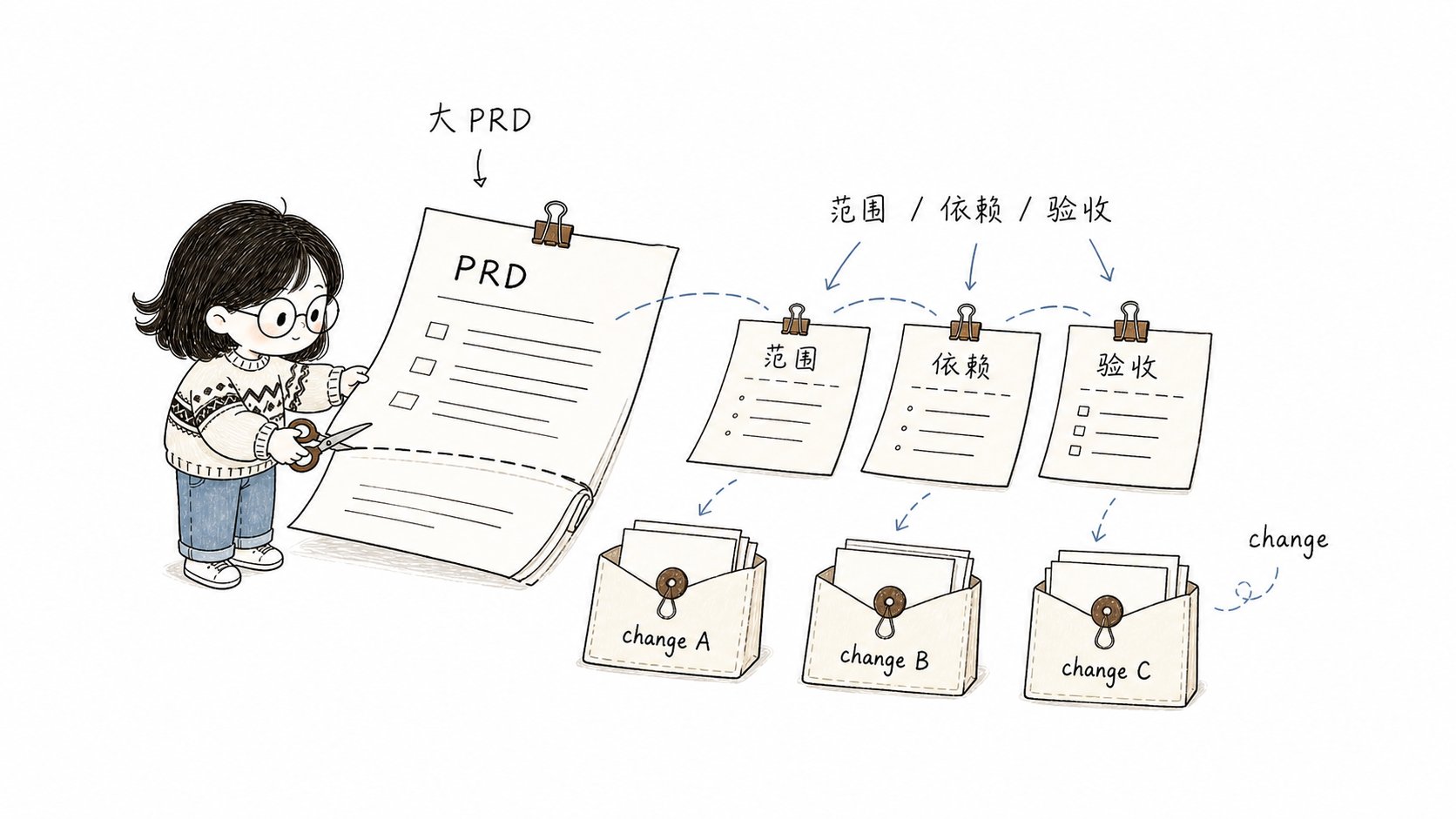
Split a large PRD into independent Changes, define each scope, dependency, and acceptance boundary, then advance them one by one.
Candidate split list
When recommending splitting, Comet will list for each candidate:- Suggest changing the name
- Objectives and scope boundaries
- Clarify non-targets
- Dependency relationship or recommended execution sequence
- The corresponding core acceptance scenario
The user’s choice of one of three (blocking point)
Before creating any proposal/design/tasks **, Comet must pause to allow you to select:- ** Create multiple OpenSpec changes** - Create independent changes one by one according to the candidate split.
- ** Keep as a change** - Continue with the single change process and record the reasons for not splitting in proposal/design/tasks.
- ** Adjust the split plan ** - After stating the adjustment direction, re-output the candidate split list and confirm it again.
How is each change created
After choosing to split, each accepted split item is created through an independent/comet-open. The use of /opsx:new is prohibited here for the following reasons:
/comet-opensimultaneously creates OpenSpec artifacts ** and **.comet.yamlto ensure that each change enters the Comet state machine./opsx:newonly creates OpenSpec artifacts. Changes will fall outside the state machine and cannot be restored or guarded with/comet.
- When entering each split item, mark “Confirmed Split Item”, and carry the objective, scope, non-objective and acceptance scenario of this split item.
- It has been confirmed that the split item skips the PRD split pre-check by default (unless the split item itself still clearly contains multiple independent capabilities).
- A single split item will not automatically flow to
/comet-designafter completing the open phase. After the split is completed, pause and let you choose which change to start.
How to advance after the split
Splitting generates multiple active changes. Promotion method:- Each change independently goes through design → build → verify → archive.
- After a change is archived, use
/cometto select the next active change to continue. - There can be a dependency order among the changes (marked in the candidate split list), but Comet does not enforce serialization - you can advance independent parts in parallel.
How to restore it if it’s interrupted
Batch splitting does not add dedicated status files. Rely on the existing active changes for minimum breakpoint recovery:- After the split process is interrupted, check the created active changes first when restoring.
- Split items that already exist and contain
.comet.yamlwill not be created repeatedly. - The uncreated split items will continue to be created through
/comet-openaccording to the split list you have confirmed. - If the confirmed split list in the conversation cannot be restored, Comet will reconfirm the split list with you before continuing.
Real-life scene examples
Scene One: User System Reconfiguration
Enter a PRD that includes four modules: “User Registration and Login, Personal Information, Permission Management, and Operation Audit”.
You select “Create Multiple changes”. Comet creates
user-auth, user-profile, user-rbac, user-audit one by one, and each one is an independent active change.
When advancing, start with user-auth (dependency free) first:
user-auth and go through design → build → verify → archive. Then continue with user-profile.
Scene Two: Platform Migration
Enter a migration plan that includes “replacing the database, rewriting the data access layer, migrating the API, and updating the front-end adaptation”.
Here, the dependencies are strongly serial, and the candidate split list indicates the recommended execution order. You advance in sequence as 1→2→3→4.
Scene Three: No need for splitting
Enter a focused requirement: “Add a rich text editor and image pasting function to the existing note-taking module.” After clarification, Comet determined that this was a capability (note editing enhancement), which did not meet the requirements for splitting signals (no multiple independent capabilities, no phased milestones), and ** splitting is not recommended **, directly entering the single change process. If Comet recommends splitting but you decide that this time they should be done together (for example, front-end and back-end changes must be launched simultaneously), you select “Keep as one change”, and Comet will record the reason for not splitting in the proposal.The relationship between splitting and lightweight presets
PRD splitting occurs in the open phase of the full workflow. hotfix and tweak presets do not involve splitting - they are just individual minor changes themselves. If during a hotfix process, it is found that the scope has expanded (across modules, new apis, schema changes), it should be upgraded to full, and then the open phase of full should determine whether splitting is necessary. For details, please refer to Lightweight PresetNext step
- Workflow concept ](/en/concepts/workflow) - Understanding the position of the open phase within the entire five phases
- open stage - Complete steps and products of the open stage
- Project file structure - Directory structure of multiple changes after splitting