

New Classic changes use SDK Runtime and
comet-state.yaml. Existing .comet.yaml records
continue along their original workflow. Stages, confirmation, validation, and archive requirements
remain unchanged. The legacy Run file layout below helps identify existing records. Machine
execution data for new changes lives in the user Comet data directory; see SDK persistence and
recovery./comet re-reads those files instead of relying on the previous conversation. If you know which files to check and which commands to run, you can quickly judge progress and resume safely after an interruption. Project-level configuration (.comet/config.yaml) is covered in Classic configuration.
The rest of this page uses <classic-root> for the current Classic OpenSpec root directory: docs/openspec/ by default for new projects, and openspec/ for projects that keep the legacy layout. The actual location is decided by classic.artifact_layout; see Project file structure.
This page has three parts. The complete field reference is in the appendix:
- How to check current progress: where state files live and which fields to check first.
- Which settings require your confirmation: what you select at workflow checkpoints and what Comet maintains automatically.
- How to troubleshoot abnormal states: transition history, run-state boundaries, and diagnostic command entries.
How to check current progress
To answer “where are we and what is left”, the normal path is to call/comet again (see Resuming interrupted work); to check by hand, run comet status. Both re-read the state files on disk; neither guesses from conversation history.
State lives in three files
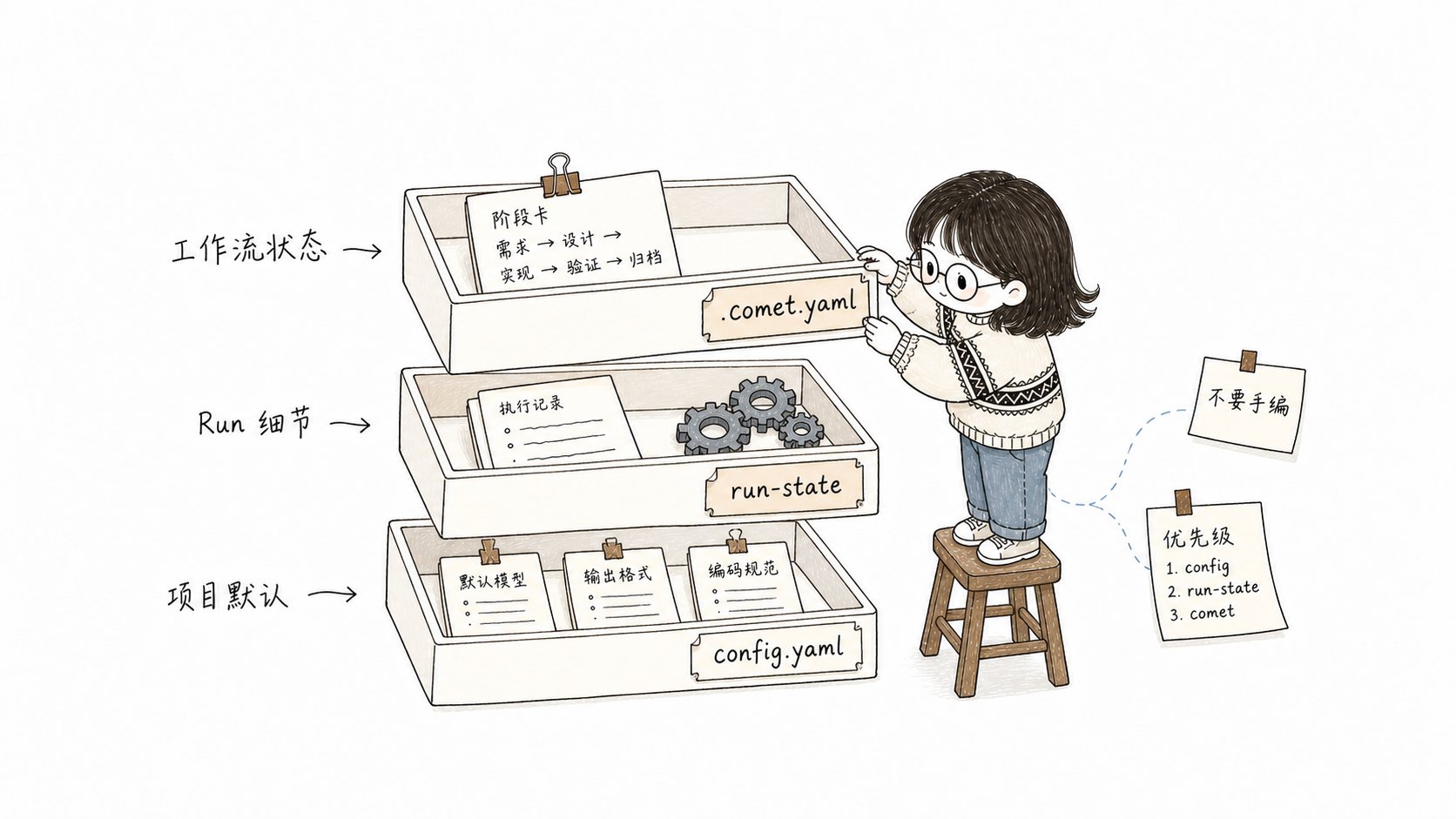
.comet.yaml tells you where the change is, Run state lets the runtime recover, and
state events explain why the state changed
Which fields quickly tell you progress
comet status and /comet resume routing mainly use the fields below. Full types and allowed values are in the appendix.
branch_status: handled only means you confirmed an immediate push or push-with-PR before archive and it was written back when archiving completed; it does not mean the push or PR succeeded.
With several changes in parallel, pick the target first
.comet/current-change.json stores the workflow and change you explicitly selected, removing write ambiguity when multiple active changes run in parallel. It does not replace .comet.yaml.
- With a single active change, attribution can be automatic.
- With several active changes, you must explicitly
selectafter entering the target change. - When the target is archived, the selection file is damaged, or the workflow does not match, the guard fails closed (it refuses to run rather than continue on bad state).
- When
isolationiscurrent,branch, orworktree, the change is also pinned throughbound_branchto the branch where the isolation was set up. On drift, switch back to the original branch; runcomet state rebind <change-name>only after you explicitly confirm that the current branch should take over the change. - Do not hand-edit
current-change.json.
Which settings require your confirmation
Fields in.comet.yaml can be grouped into two types: settings you confirm at workflow checkpoints, and runtime records maintained automatically by Comet. Do not hand-edit auto-maintained fields (see the next section).
Choices you make at workflow checkpoints
Most of these fields are copied from project defaults when a change is created. If you skip a choice, the guard blocks before stage exit and routes you back to the correct decision point. You do not need to edit files manually. Recovery for missing
isolation, build_mode, or tdd_mode in build is covered in Resuming interrupted work.
What is checked before moving to the next stage
These constraints exist in both guard layers,comet guard and comet state transition:
A direct
comet state set <name> phase <value> is hard-blocked unless
COMET_FORCE_PHASE=1 is set (repair only). Phases advance only through
comet guard —apply or a valid transition.COMET_FORCE_PHASE is a troubleshooting-only switch; normal flows never need it. For the other environment variables, see Classic configuration.
Preset escalation goes through a valid transition only
When a hotfix/tweak hits an escalation signal (cross-module, new API, schema change, and so on), thepreset-escalate transition upgrades it to full:
- It sets
workflow/classic_profiletofullin one go, rollsphaseback todesign, and clearsdesign_doc. - This is the only legal channel from preset to full — a direct
set phase designis hard-blocked, andclassic_profileis machine-owned, soset classic_profileis hard-blocked too.
Fields maintained by the system
These fields are written by Comet to record runtime facts. You do not need to set them manually, and you should not force them withcomet state set.
Common examples:
bound_branch: records which branch this change is bound to, so execution does not continue on the wrong branch.verify_failures: the consecutive verification-failure count.verify-failincrements it, andverify-passorarchive-reopenresets it to0. After it reaches 3, the next failure pauses and asks you to choose a retry-limit strategy.archive_confirmation: Comet writespendingafter verify passes; it becomesconfirmedonly after your confirmation before archive.currentStep,pending,artifacts, andtrajectoryin.comet/run-state.json: written automatically by the Engine runtime.
/comet-archive.
How to troubleshoot abnormal states
First distinguish two situations: interruption (session closed, context compressed, device switched) and state anomaly. For interruption, call/comet to resume. Use comet status and comet doctor only when .comet.yaml is missing or malformed, routing is wrong, or declared evidence is missing. The complete flow is in State damage and recovery.
Check state transition history
Classic state transitions share one set of semantics. Every successfulcomet state transition, comet guard --apply, and archive update appends one JSON line to:
Look here when you want to know why
phase changed or what the last transition did. For the available transition events and commands, see comet state and Auto-transition.
Distinguish workflow state and runtime details
.comet.yaml holds the user-understandable workflow state. Engine execution details live in .comet/run-state.json. The two are linked by run_id.
See Skill and Engine (Advanced) for details.
Common diagnostic commands
Engine-level details (currentStep, pending, trajectory) are usually only needed during troubleshooting. Start with these two commands:
comet status— shows an active change’sphase, verification result, whether the declared evidence actually exists on disk (runtime_eval), and a hint about the next step.comet doctor— checks the installation, environment, Skill integrity, and whether each change’s.comet.yamlis valid.
Appendix: .comet.yaml field reference
Every active change includes the fields below in .comet.yaml. The body explains which fields you confirm and which are system-maintained. The tables here are for quick lookup of value ranges and meanings.
Workflow and stage
Execution mode
Verification and branch
Path references
Time and archive
Continue reading
- Classic configuration —
.comet/config.yamlfields, configuration precedence, and environment variables - State damage and recovery — diagnosis and recovery with
comet status/comet doctor - Context compression mechanism — the
off/betamodes ofcontext_compression - Code review mechanism — the
off/standard/thoroughmodes ofreview_mode - Skill and Engine (Advanced) — Run state and Engine runtime semantics
- Classic workflow — how the five stages use these state fields