

/comet followed by one sentence. Once the project configuration selects Classic, the internal /comet-classic entry has to decide which Classic profile this call should take. That decision is driven by intent recognition, slot extraction, and the actual file state.
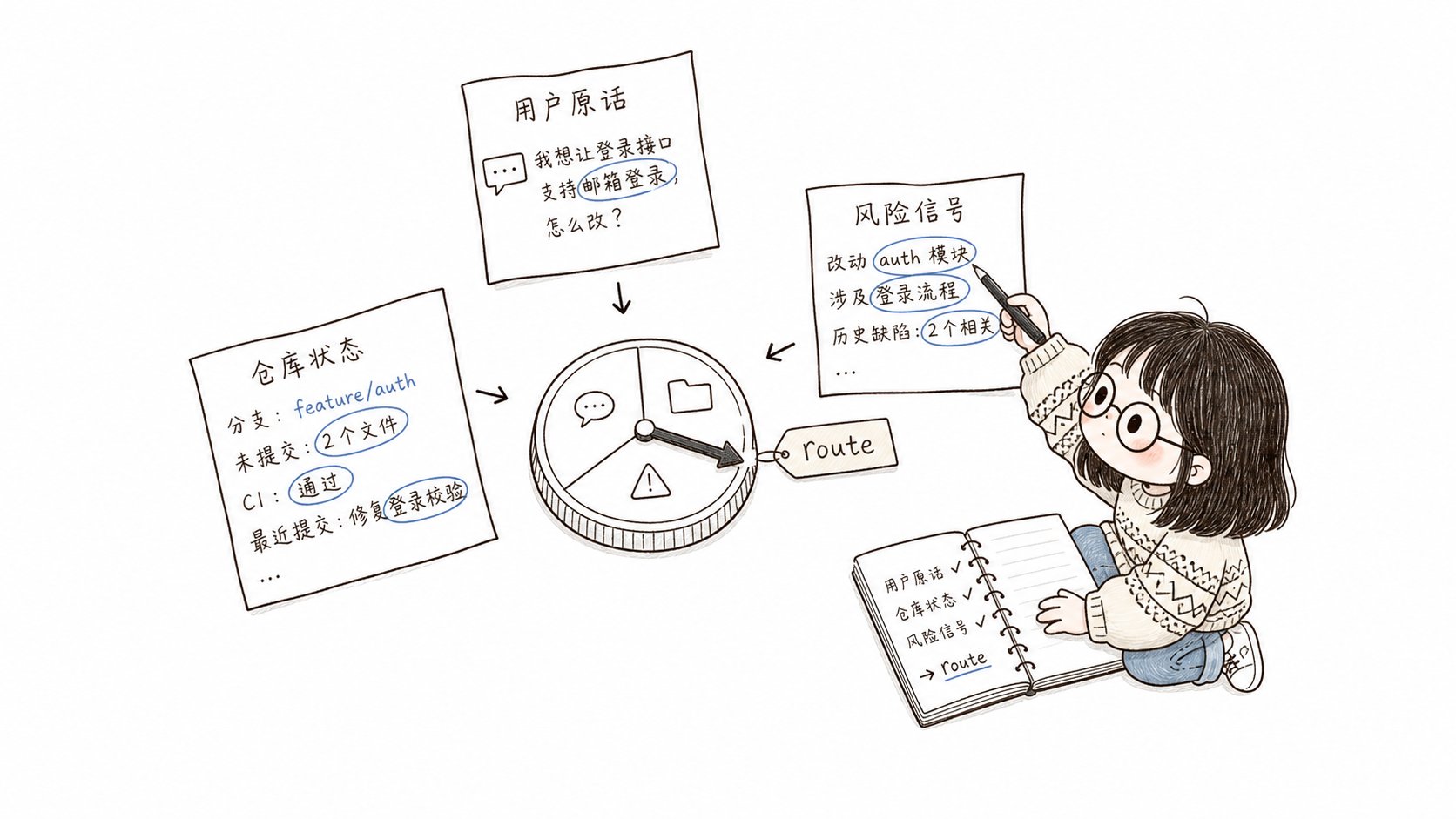
The routing context records the user request, repository state, and risk signals, and the runtime computes the route from it
The six routing outcomes
After you type one sentence, Comet routes the call to one of these six outcomes:
Notes:
- Only
ask_userandout_of_scoperequire explicit confirmation — when the evidence is insufficient, Comet pauses and waits for your choice. full/hotfix/tweakeach map to one fixed entry Skill, while the next step forresumedepends on which stage the change you want to resume is currently paused at.
A few typical scenarios
The examples below show how the same user input routes differently depending on the context.Scenario one: fix a known bug
intent.name:fix_bug, with high confidenceexisting_behavior: true(fixing existing behavior)- All risk signals are
false - Evidence of
workflow_candidate: hotfix
hotfix, next step comet-hotfix. This is the standard hotfix profile: fixing existing behavior without touching new capabilities, APIs, or schemas.
Scenario two: you say “small change” but touch a public interface
intent.name:make_tweakuser_explicit_workflow: tweak(you explicitly said “small change”)- But
public_api_change: true(removing a CLI flag changes an external interface)
ask_user. The explicit tweak conflicts with the risk signal, so the runtime pauses and asks whether to continue this lightweight flow that affects an external contract.
Scenario three: resume an in-progress change
requested_action: continuechange_id: note-board, and it is inactive_change_names
resume. What happens next depends on which stage the note-board change is currently paused at.
Scenario four: just asking a question
intent.name:ask_questionrequested_action: question
out_of_scope. You are asking a question and did not ask to run a workflow, so Comet stays in the information-query scope.
What to know when using it
For ordinary users, you do not need to write the routing context by hand. After you call/comet and the configuration selects Classic, /comet-classic assembles the context and scores it automatically. You only need to know:
- Say clearly what you want to do. The more specific you are, the more accurate the route. “Fix this bug” is more likely to hit
hotfixthan “take a look”. - Comet asks you when the evidence is thin. When evidence is insufficient or conflicting, it pauses at the routing entry and waits for an explicit decision.
- Routing can be traced afterwards. If you think the route was wrong, the routing context and diagnostics record the complete basis for the decision.
route, the diagnostics (divergence diagnostics), and the complete normalizedFrame. Field meanings are in the reference/intent-frame.md shipped with the Skill.
Relationship to /comet-tweak
The routing context lets /comet-classic route to tweak automatically — so is the standalone /comet-tweak command still useful?
Yes, but the two are positioned differently:
/comet: the normal user entry; it selects Native or Classic according to the project configuration./comet-classic: the permanent internal entry of Classic; the routing context decides betweenfull/hotfix/tweak/resume. It is commonly reached by forwarding from/comet./comet-tweak: the tweak-only OpenSpec action path, for a medium change whose scope is already confirmed.
/comet-classic is “decide within Classic which flow I should take”, while /comet-tweak is “I already know I am running tweak”. The complete five-stage full still runs the Superpowers design/plan/build path.
How routing is decided (read when reproducing or debugging)
The structures below exist to explain and debug routing results; you do not need them for everyday use.What the routing context solves
Before the routing context, the/comet-classic entry relied on a block of natural-language rules in the Skill body — “if it is a bug, go hotfix; if it is a copy change, go tweak…”. This approach has three problems:
The routing context turns “what the user wants” into structured data with fields, evidence, and confidence. The runtime no longer takes the agent’s routing suggestion as-is; it re-scores to produce the final route and writes any disagreement into the diagnostics log.
Since 0.4.0, this mechanism (implemented as
CometIntentFrame) has replaced the natural-language experience rules in the Skill body, making routing results explainable, reviewable, and recoverable; in our benchmark tests, Comet’s recoverability improved substantially as a result.
Intent recognition and slot extraction
Intent recognition answers “what do you want to do”: start a new change, fix an existing bug, make a lightweight adjustment, resume an in-progress change, or just ask a question. Slot extraction breaks your words and the repository state into structured routing signals — actions, candidate flows, risk markers — each marked with its source, for the runtime to score by fixed priority. The core inputs to the routing decision areintent (intent recognition) and slots (slot extraction), which together with the remaining fields form CometIntentFrame — the runtime scores this structure and returns the final route:
Intent recognition (intent)
intent has two subfields:
name: the intent type, one ofstart_change/fix_bug/make_tweak/resume_change/ask_question/unknownconfidence: a 0–1 confidence score. Below 0.7, the runtime routes straight toask_user— better to stop and ask than to bet on an ambiguous intent.
Slot extraction (slots)
The slots that matter most for routing are the risk-signal booleans. They decide whether “this should go through the full flow”:
If any risk signal (
new_capability/public_api_change/schema_change/cross_module_change) is hit, the runtime leans full even when you said “small change”.
How the runtime scores
After the agent assembles the routing context, the runtime (comet-intent.mjs) re-scores it by a fixed priority and returns the final route.
This fixed priority order is the core of explainable routing.
Every step has a clear condition, and disagreements are written to the diagnostics log so they can be traced later.
- Confidence below 0.7 →
ask_user. When the agent cannot determine your intent, the runtime pauses and asks you to confirm. - Multiple in-progress changes and none named →
ask_user. Comet lists the candidate changes and waits for you to name the target. - Risk signals beat the flow you said out loud. You say “go hotfix”, but
public_api_changeis hit, so the runtime pauses and asks you to confirm. - No risk signal + fixing an existing bug + evidence →
hotfix. That is the typical hotfix profile. - Insufficient evidence →
ask_user. Comet asks instead of guessing a route.
Next steps
- Classic workflow — the five stages, stage handoffs, and the verify drift decision
- Five-stage pause points and user selection points — how Comet stops and asks you at key points
- Classic command overview — how scripts such as
comet-intent.mjscooperate