

brainstorming, guiding you through multiple rounds of solution discussions, and finally produces a Design Doc. From your perspective, this is a real brainstorming session - Comet will repeatedly discuss the implementation plan, trade-offs, and risks with you, and only write the documentation after confirming the plan.
How is this stage triggered
/comet-design is commonly connected automatically by /comet-classic.
Default: Use /comet for automatic connection
After the open phase exits (comet-guard <name> open --apply advances phase: design), /comet-classic will automatically connect and call /comet-design - you don’t need to manually enter the next phase command after the open phase is completed. The next time /comet-classic is called, if phase: design is detected or there is a change but the Design Doc is missing, it will also be routed to design. For details, please refer to Automatic Propulsion Mechanism
Manual: When is direct /comet-design needed
- After the automatic connection (
auto_transition: false) — open is completed,/comet-classicwill stop and print hints. You need to manually call/comet-design. - Just want to run the design alone (restore a change that already exists but lacks the Design Doc, or want to redo the technical design).
- If the hotfix/tweak hits the qualitative change upgrade signal, roll back to design to complete the design.
/comet normally; The stage command is directly invoked only during the manual control stage. **
What will you experience
The core of the design stage is a brainstorming session based on real context. brainstorming directly uses scripts to generate “handover packages” from artifacts in the open phase, and the design basis thus comes from real requirements and project documents.Step 0: Entry status verification
handoff_context and handoff_hash already exist, first confirm whether they match the current artifacts, and then decide whether to regenerate them.
Step 1a: Generate the handoff handover package
It must be generated by a script and cannot be replaced by a handwritten summary by the agent on the spot. This is the core of reliability in the design stage.context_compression configuration:
Write both
handoff_context and handoff_hash into .comet.yaml simultaneously. When complete context is needed, add --full.
The source of the handover package is the four artifacts in the open phase: proposal.md (target motivation range), design.md (high-level architecture), tasks.md (task boundary), and specs/*/spec.md (delta spec).
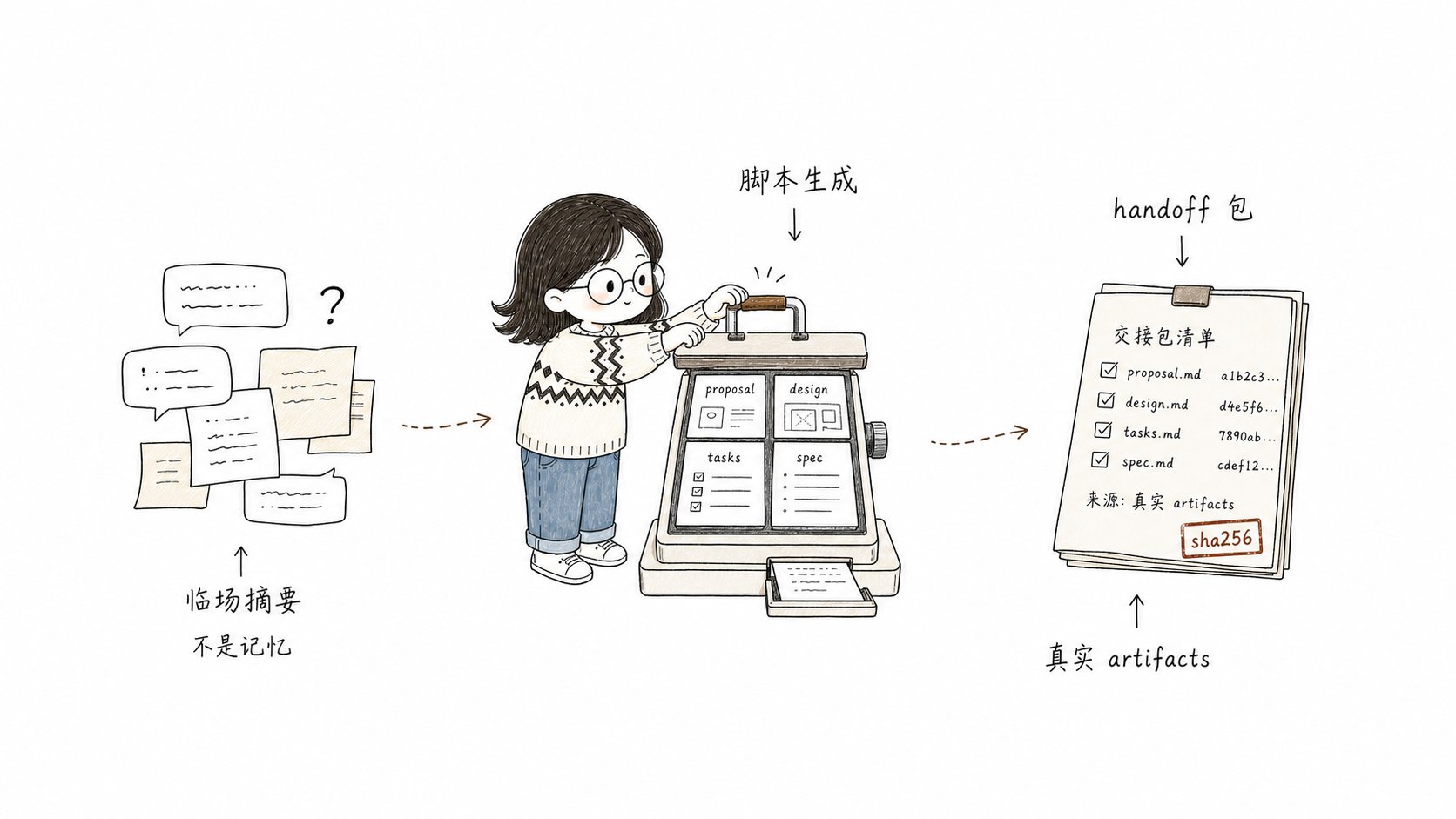
handoff handover package is directly generated by the script reading real artifacts to produce
Step 1b: Conduct brainstorming (with real context)
Load Superpowersbrainstorming and conduct in-depth technical design with the handover package as the context. Comet will not skip the clarification process of brainstorming just because of “context redundancy” - it will:
- Discuss the implementation plan, technical risks, testing strategies, and boundary conditions
- If the target/scope/non-target/acceptance scenario/key constraints are still unclear, ** continue to ask questions **
- ** Do not create a Design Doc after just one round of Q&A ** — Go through the complete process of clarification → 2-3 candidate proposals → step-by-step confirmation
- During the Design process, ** incremental update **
brainstorm-summary.md(restore checkpoints, not Design Doc) will be carried out. The confirmed facts, constraints, candidate solutions, trade-offs, and Spec Patch candidates will be recorded. Unconfirmed items will be marked as “pending confirmation” or “candidate”.
If
brainstorming skill is not available, the Comet will stop and prompt you to install/enable Superpowers,
will not use ordinary conversations instead of .Pause point 5: Confirm the design plan
After brainstorming generates a plan, Comet pauses ** to wait for your clear confirmation **. Before confirmation, one cannot create a Design Doc, writedesign_doc, run design guard, or enter /comet-build. The summaries it presents include:
- The adopted technical solution
- Key trade-offs and risks
- Test strategy
- If there is a Spec Patch, list the delta spec changes that will be written back
Step 1d: Finalizing brainstorm-summary.md
After confirmation and before creating the Design Doc, Comet writes the confirmed solution intobrainstorm-summary.md. The structure is: confirmed technical solution/Key trade-offs and risks/Test strategy/Spec Patch. This is the recovery anchor point after context compression.
Step 1e: Proactive context compression (non-blocking)
After the Design Doc, state, and handoff are all written to disk, and before entering build, Comet ** actively triggers context compression once **:- When the platform has a native compression mechanism (compact/compaction command or UI), Comet triggers it once - it ** will not ** pretend to compress with a shell script.
- When the platform does not support automatically triggered compression, Comet gives a compression suggestion and ** continues directly **, without adding a pause point for this.
Step 2: Create a Design Doc
Create a Design Doc in the main session using the full brainstorming context with minimal frontmatter:docs/superpowers/specs/YYYY-MM-DD-<topic>-design.md. If there is a Spec Patch, edit the corresponding specs/*/spec.md.
Step 3: Update status + Advance
phase: build.
The invoked skill
The OpenSpec skill is not called in the design phase — OpenSpec artifacts have been created in the open phase.
Product
Exit condition (guard check)
When leaving design, guard checks:- The Design Doc has been created
- frontmatter includes
comet_change,role: technical-design, andcanonical_spec: openspec handoff_contextandhandoff_hashhave been written into.comet.yamlhandoff_hashmatches the current OpenSpec artifacts (a mismatch aborts immediately)- markdown handover tape traceable markers (source path, mode, sha256)
- The
spec-context.jsonstructure is effective in beta mode
When to enter
Normally,/comet-classic enters Design automatically after Open completes (see How this phase is triggered). Manual scenarios include a hotfix/tweak that crosses the upgrade threshold and needs full Design, or a recovered Change whose design document is missing.
”Restore
The design stage is idempotent and can be safely repeated.brainstorm-summary.md is a persistent recovery checkpoint - after context compression, reloading it along with two handover package files will allow you to continue. If the design plan has not been confirmed yet, go back to 1b/1c; If confirmed, create a Design Doc.
Next step
- Build Phase — Enter planning and execution after design completes
- Context Compression Mechanism — Detailed explanation of off/beta modes for handoff packages
- Workflow Intermediate Artifacts — brainstorm-summary and other artifacts
- Five-Phase Pause Points and Decision Points — Detailed design pause points