

The shortest path
/comet” in the AI coding platform and describe the changes you want to make. The project configuration will enable a unified entry point to access Classic.
What does Classic initialization do in existing projects
comet init --workflow classic won’t ask you “Are you already using OpenSpec/Superpowers?” It detects each component one by one and then lets you decide whether to override or skip it.
Component detection
The Classic initialization checks whether the following three types of components already exist:
CLI dependencies are checked separately (whether
openspec and codegraph are on the PATH). Those that have already been installed are not checked by default and will not be reinstalled.
Processing of existing components
When an existing component is detected: If multiple existing components are detected on the same platform, they should first be selected in batches (overwrite all/skip all/select one by one), and then processed one by one.The directories and files created by init
When installing project-level Classic,comet init --workflow classic will:
- Run
openspec initto create the current Classic OpenSpec root directory; By default, new projects usedocs/openspec/. For projects that already have the root directoryopenspec/, thelegacylayout is retained - Install Comet Skill, rules and hooks to the target platform directory
- Create working directories
docs/superpowers/specs,docs/superpowers/plans, and.comet/ - Write to the default
.comet/config.yaml(if it does not exist
.comet/config.yaml is a project-level configuration. Each change’s .comet.yaml is created by /comet-open, not init
Created. classic.language will be snapshots to .comet.yaml when creating a change, which is used to constrain OpenSpec and
The main language of Superpowers products.Four scenarios for existing projects
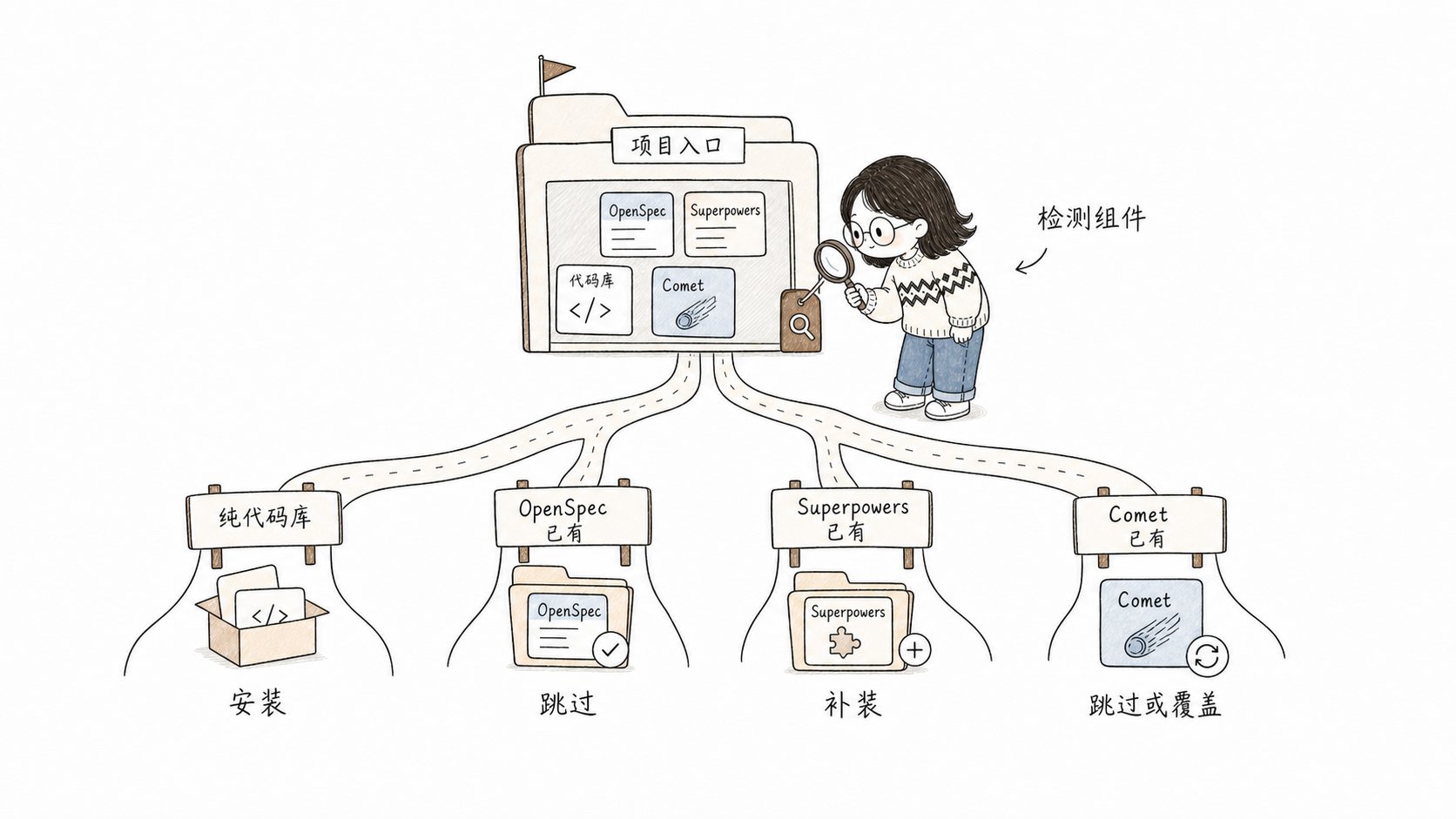
project, first detect the existing components, and then decide whether to overwrite, skip, install or update
Scene One: Pure code base, without using OpenSpec/Superpowers
The most common scenario. The Classic initialization does not detect any existing components. All are installed:/comet.
Scene Two: OpenSpec is already in use
You already have the root directoryopenspec/ and an active change. comet init --workflow classic will recognize it as the existing Classic legacy layout and will not automatically move to docs/openspec/ during upgrades. When it is detected that OpenSpec Skill and CLI already exist, you will be asked to choose to overwrite or skip. It is recommended to skip the existing components and only supplement the Comet part.
The openspec init in the Classic initialization run is idempotent - OpenSpec will handle the currently configured root directory and will not break the existing changes. If you want to migrate from the old layout openspec/ to the new layout docs/openspec/, please refer to Migrate Classic Layout
Scene Three: Superpowers are already in use
You already have skills such asbrainstorming and writing-plans (which may be installed through plugins). After the Classic initialization detects it, it also allows you to make a choice. It is recommended to skip to avoid overwriting your custom version.
Scene Four: Use both OpenSpec and Superpowers simultaneously
Both sets of components already exist. The Classic initialization will prompt in batches. Just select “Skip All”. It only installs Comet Skill, rules, hooks and working directories.Historical change: There is an OpenSpec change but no.comet.yaml
This is the most common pitfall when integrating existing projects.”Problem”
If you previously created OpenSpec changes using the original/opsx:new, these changes ** do not have .comet.yaml**. At this moment
comet statuswill ** silently skip ** them (no error is reported, but they are not displayed either).comet doctoralso does not detect this type of change.- Only after calling
/cometin the Agent platform and entering Classic will the internal routes discover them throughopenspec list --json.
Take over the existing OpenSpec Change
Comet does not have takeover commands likecomet adopt or comet import. The takeover of the existing OpenSpec change relies on the idempotence of /comet-open:
- Call
/cometon the Agent platform. - The project configuration entered Classic, and the internal
/comet-classicranopenspec list --json. It was found that there was an active change but.comet.yamlwas missing. - Route to
/comet-open. /comet-opendiscovers that OpenSpec artifacts already exist. Skip the completed steps and create.comet.yamlinstead.
Suggestion
- If the existing OpenSpec change has not been advanced yet, simply use
/cometto let Classic take over. - If you have already advanced to build/verify, it is recommended to complete the current work first and then start a new change with
/comet. A forced takeover would disrupt the current state. - After connection, confirm that
comet statuscan see your change (indicating that.comet.yamlhas been added).
Upgrade the existing Comet installation
If the project is already using Comet and just wants to upgrade:comet update will refresh Comet skills, rules and scripts to the installed platform. In init, --yes will parse existing components as “skip”, so to force a refresh, --overwrite should be used.
The checklist after connection
Q&A
Will the Classic initialization overwrite my existing hooks
Will the Classic initialization overwrite my existing hooks
No. Comet non-destructive merge hook configuration, keep what you already have
hooks only replace the commands it manages itself. For details, please refer to the supported platforms: ](/en/platforms).
Can I install Comet without OpenSpec/Superpowers
Can I install Comet without OpenSpec/Superpowers
No, Comet relies on OpenSpec and Superpowers. If installed, it can be controlled through the interactive prompt’s override/skip selection, or the installed dependencies can be automatically skipped by detection.
After connecting, I can't see my change on comet status
After connecting, I can't see my change on comet status
This change might have been created by the original
/opsx:new, lacking .comet.yaml. Enter with /comet
In Classic, let the internal route take over and add the status file. For details, please refer to “Historical change” above.Next step
- Install and update the basic usage of ](/en/guides/install-and-update)-init /status/doctor
- Restoring Interrupted Work - How to restore existing changes after connection
- Project file structure - Comet to create which directories